
Product
Everything your consultancy runs on, in one place.
From the first message to the visa grant, and the commission that follows. Here is each part of ConsultMarg, with the real screens.
One price, not per user
Your bill doesn't grow each time you hire.
Prices on the website
Basic from NPR 5,000 a month. No sales call to find out.
14-day guided pilot
Try it with your own data and our setup help.
Built in Nepal
Support Sunday to Friday, 9:00 to 18:00.
01 · Leads and inbox
Every lead in one place.
A student walks in, messages your Facebook page or visits your website. They all end up in the same inbox, so nothing is lost and nobody switches between four apps.
Reception QR form
The student scans a QR code at the desk and fills a short form on their own phone, in English or Nepali. It creates an unassigned lead, flags duplicate phone numbers and blocks spam. One QR per branch, a printable A4 poster, and you can switch the form off.
Website chat widget
A chat bubble you paste on your site. Colours, title and welcome message are yours to edit, so website visitors become leads instead of bouncing.
Messenger and Instagram Direct
Connect your own Facebook page or Instagram account. Every message lands in the same inbox, with the contact's own profile photo.
WhatsApp, on request
Connect a WhatsApp Business number through your own Meta app, reply from the inbox, and use approved templates after WhatsApp's 24-hour window.
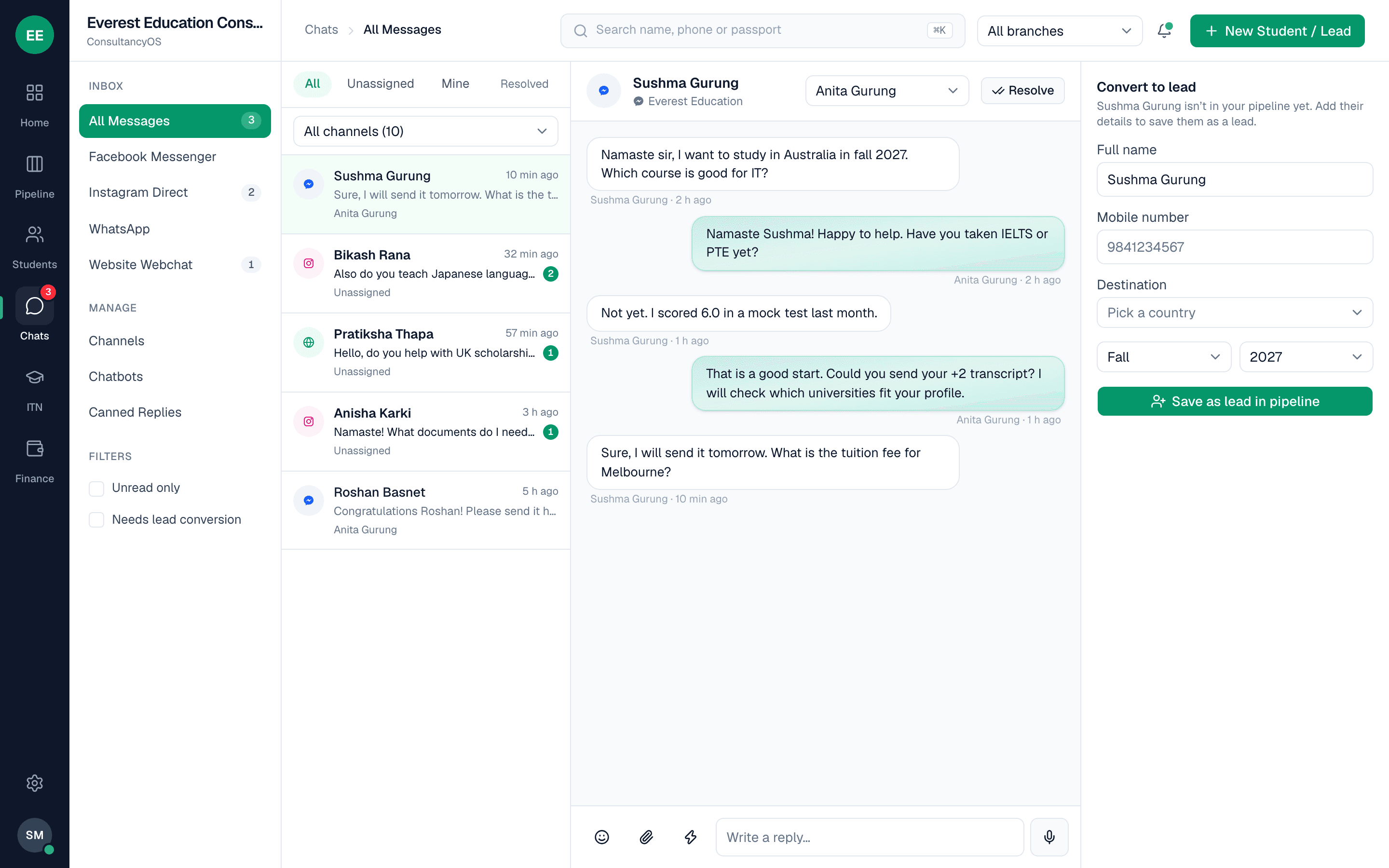
One shared inbox
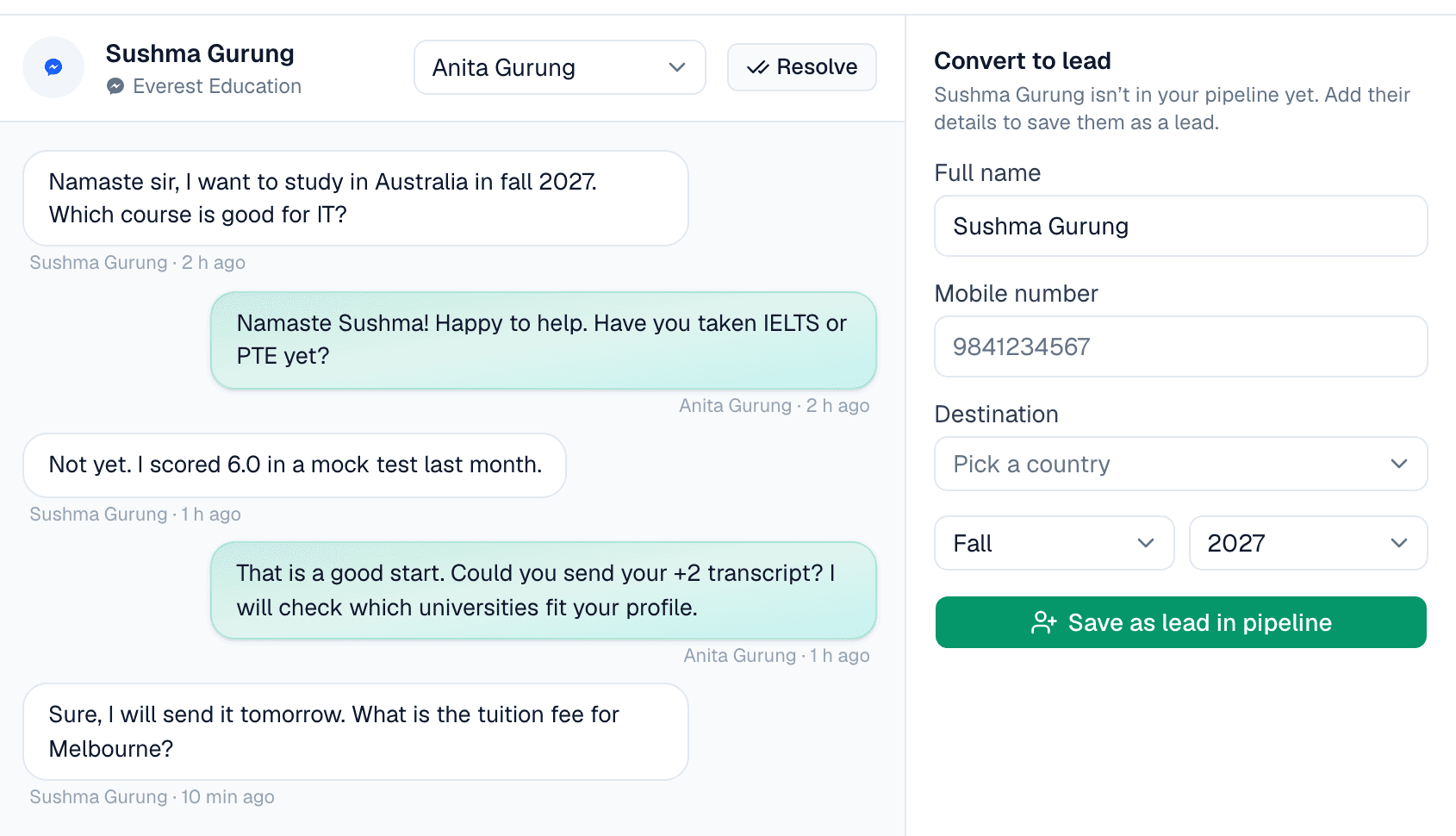
Assign conversations, mark them resolved, filter by channel with open and unread counts, send photos, voice notes and PDFs, and turn any chat into a lead with one form.
Chatbot builder
Design a flow of messages, menus and questions, plus FAQ keywords. The bot greets new chats, asks for name, phone, destination and intake, saves the lead and hands over to a person when needed. An enquiry at 11 pm is waiting at 9 am.
Canned replies
Save the answers you give every day, so replies are faster and consistent.
Import your old students
Upload a CSV or Excel file, see a row-by-row preview, skip duplicates and import the rest. Up to 2,000 rows at a time, and a sample file is provided.
02 · Booking widget
People book a counselling session themselves.
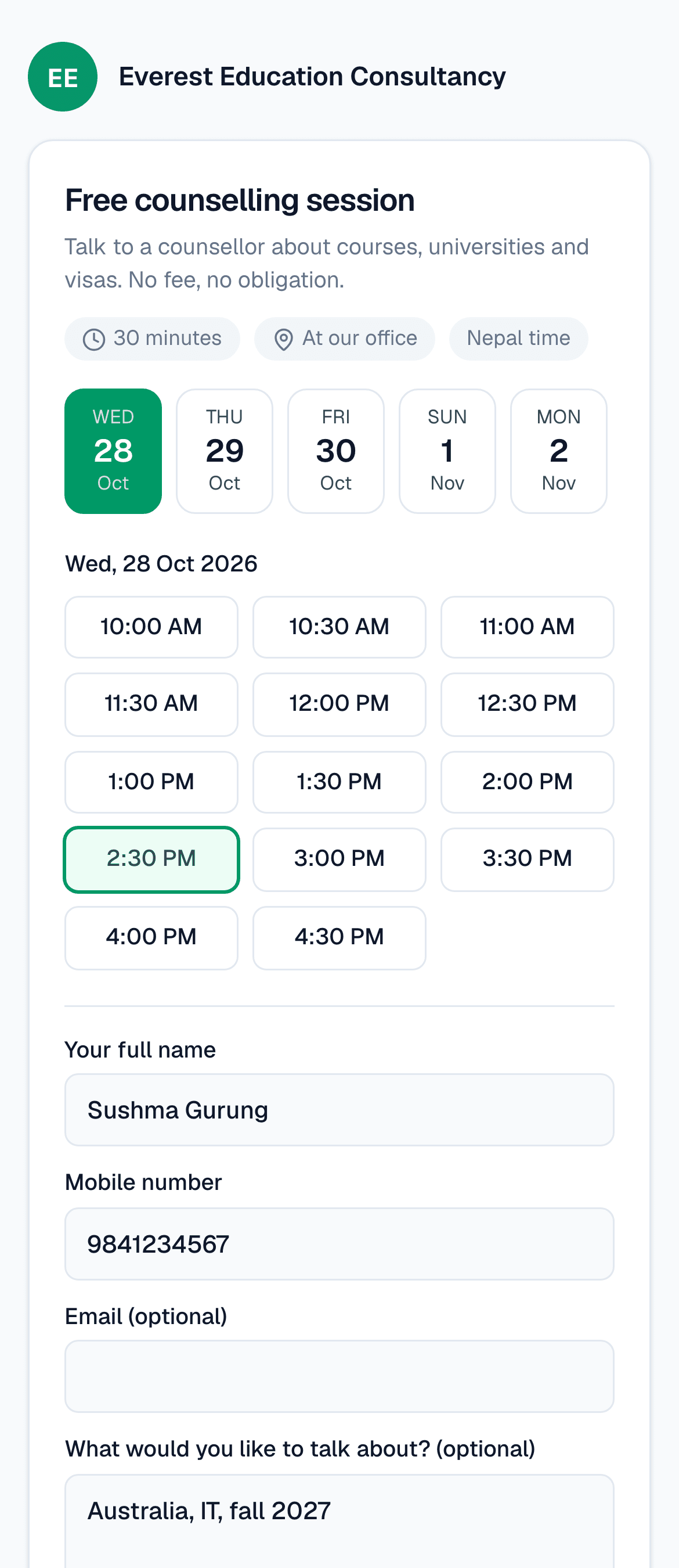
Anyone with the link or the button on your website can book, usually people who aren't your students yet. They don't need an account. They pick a day and a time, enter a name and mobile number, and the booking creates the lead.
The counselor is assigned for you
People choose a day and a time, not a counselor or a branch. The session goes to the counselor with the fewest sessions that day, and the lead goes to that counselor and their branch.
Confirmation and reminder by SMS
When SMS is set up, the person gets a confirmation, and a reminder the day before.
Your team hears on Telegram
An alert goes to your team group, and to the counselor if they have linked Telegram. The student gets no Telegram message.
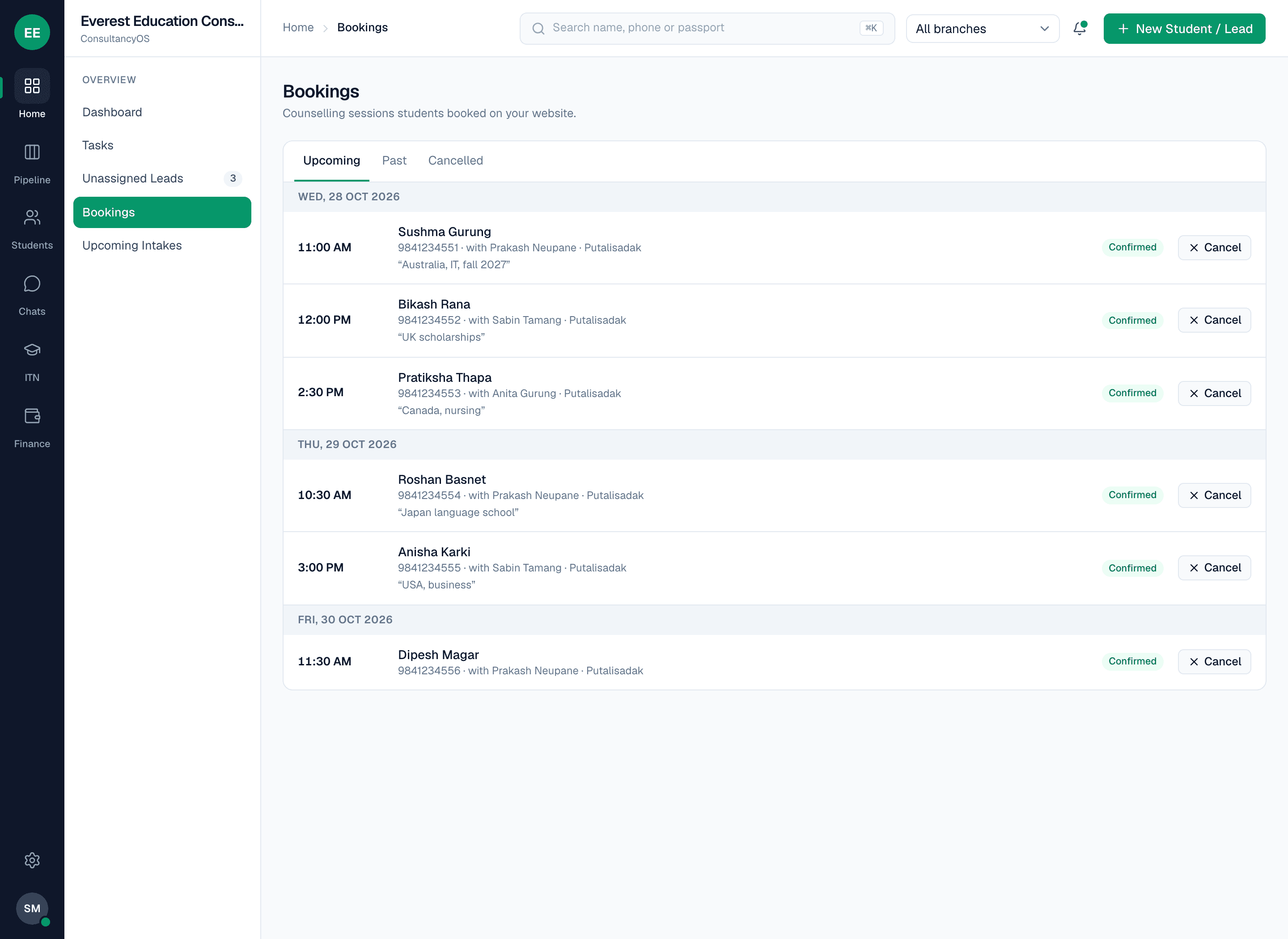
A Bookings list for staff
Each booking shows the time, the student, the counselor who was assigned and what they want to talk about.
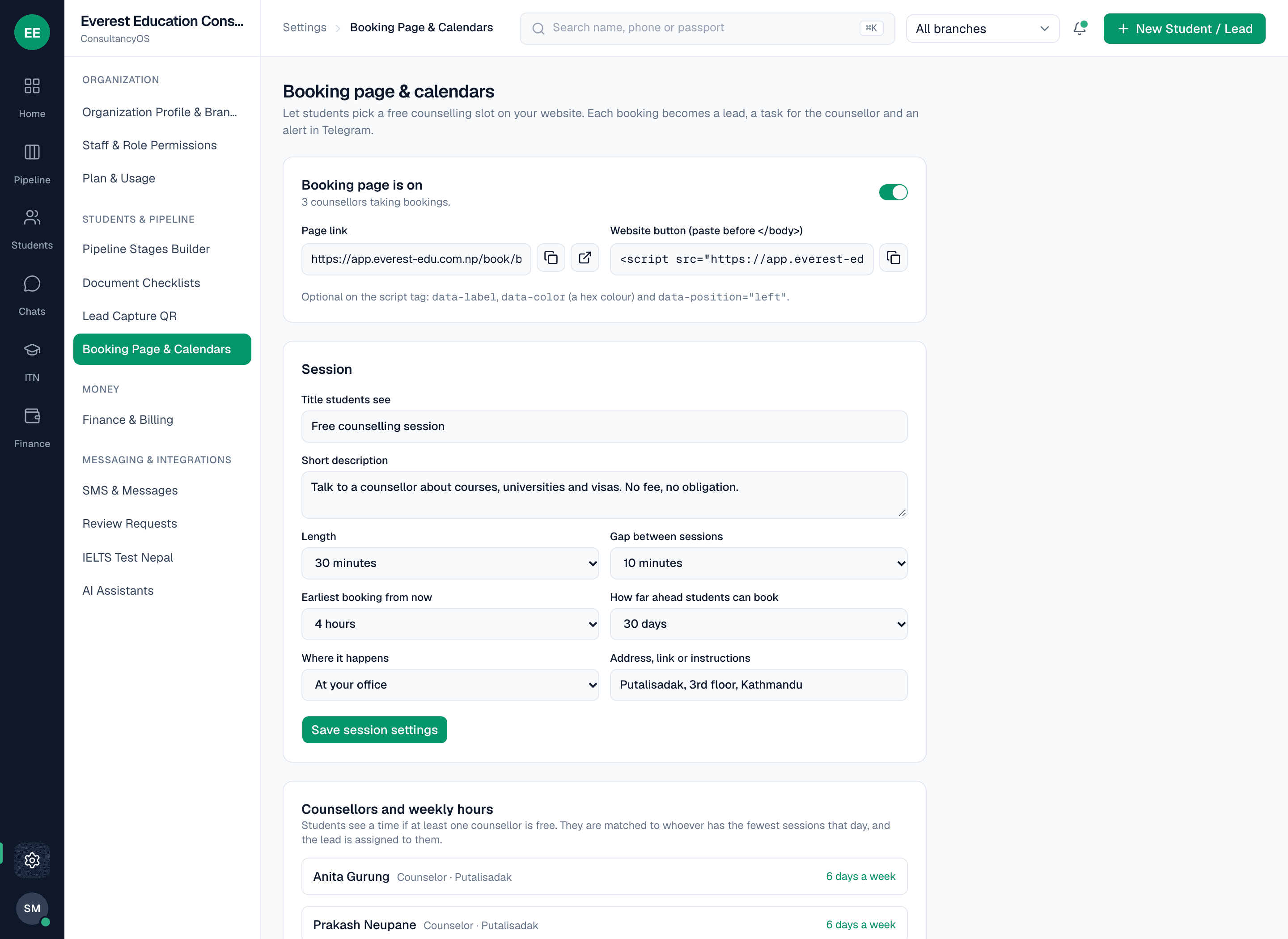
Your settings
The owner sets the session length, the gap between sessions, the notice needed and how many days ahead people can book, and gets the page link and the website button code.
03 · Speed to lead
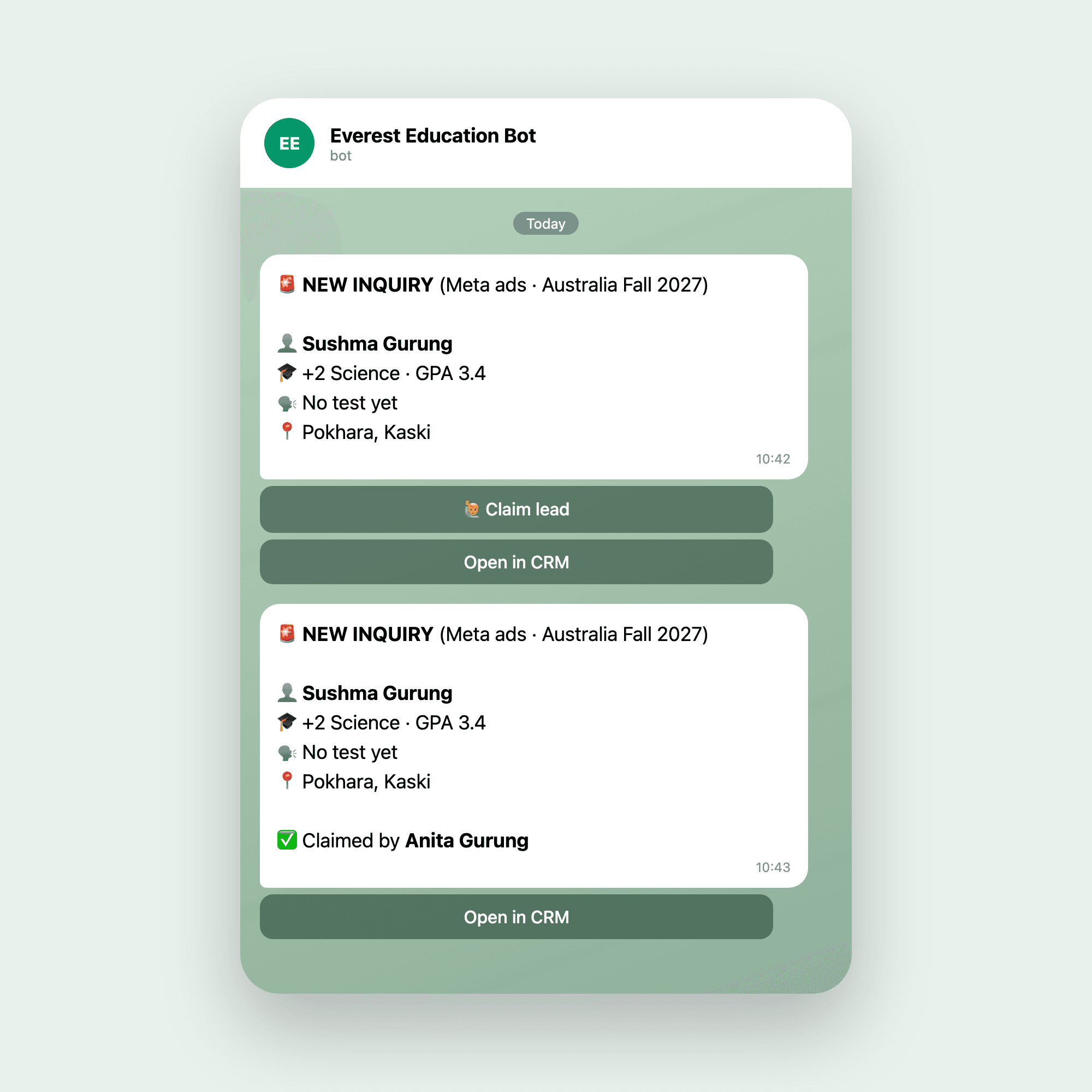
Your team hears about every lead. One counselor claims it.
Each consultancy connects its own Telegram bot, so alerts come from your brand and your data never mixes with another consultancy's.
New lead alert with a Claim button
An unassigned lead appears in the staff group. The first counselor to tap Claim owns it, and nobody else can take it. Everyone sees it happen.
Follow-up reminders
Fifteen minutes before a follow-up, the counselor gets a message with Done and Move-to-tomorrow buttons. After Done, a one-line reply is saved as a note on the student.
Owner digests
A summary at 8:30 in the morning and 7:00 in the evening for owners and branch managers. Money figures go to the owner only.
Celebrations and alerts
The team group is told when a visa is granted, when an ITN test result arrives and when a student sends feedback. Each alert type can be switched off.
Ask the bot
Staff type /today, /student, /leads, /pipeline, /overdue, /today_finance, /month_finance, /dues, /itn, /me or /help in a private chat and get an answer limited to their role. A counselor sees only their own students, and phone numbers are never sent.
04 · Lead temperature and response times
See which leads are going cold, and who is still waiting for a reply.
Every lead is marked Hot, Warm or Cold automatically, and owners can see how quickly the team answers new messages.
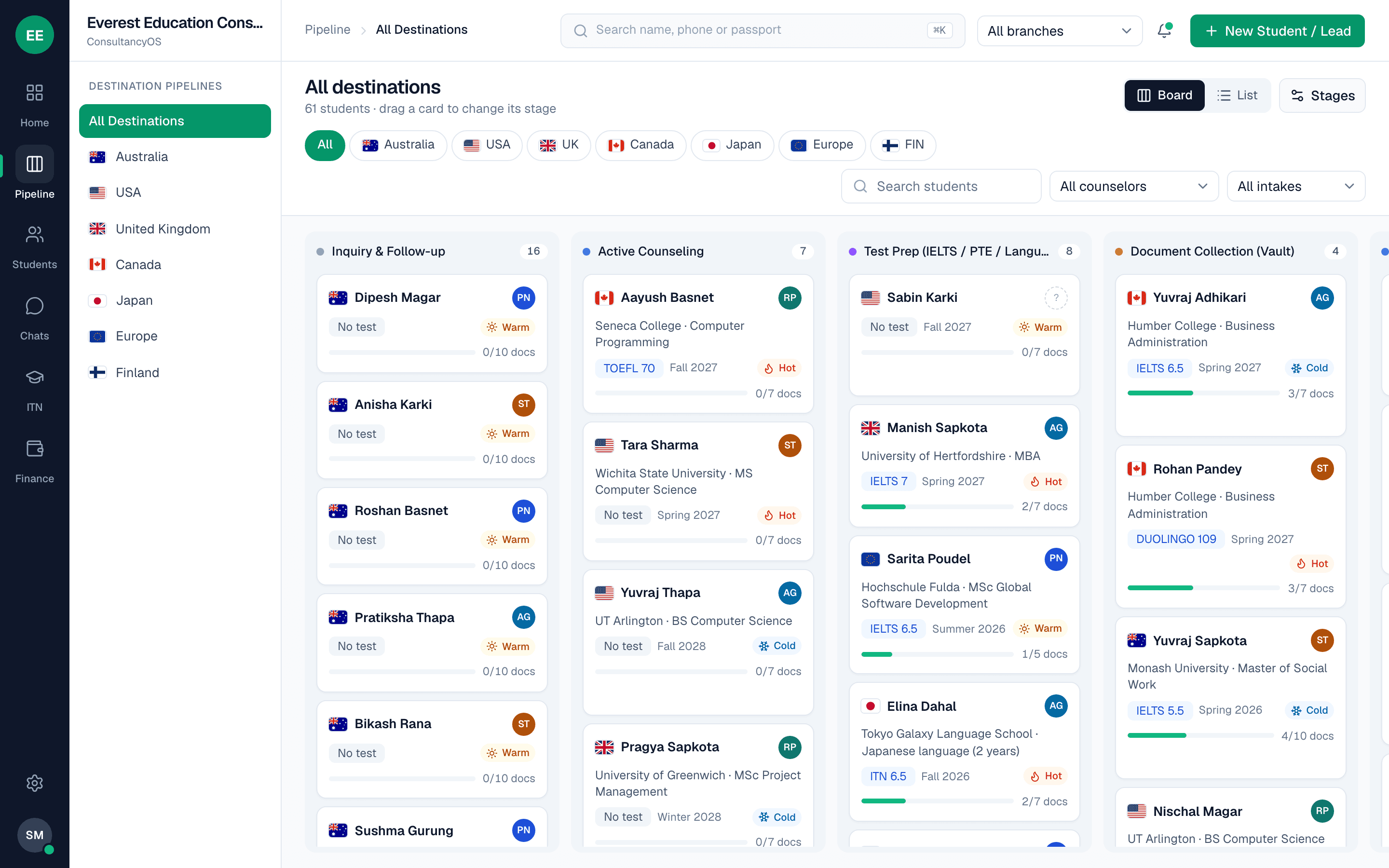
Hot, Warm or Cold
A word, not a number, on pipeline cards, the list and the student profile.
Worked out automatically
From the pipeline stage and the last activity. Hot is past the first conversation with activity in the last 3 days. Warm is activity within 2 weeks. Cold is nothing for longer. Closed files show nothing.
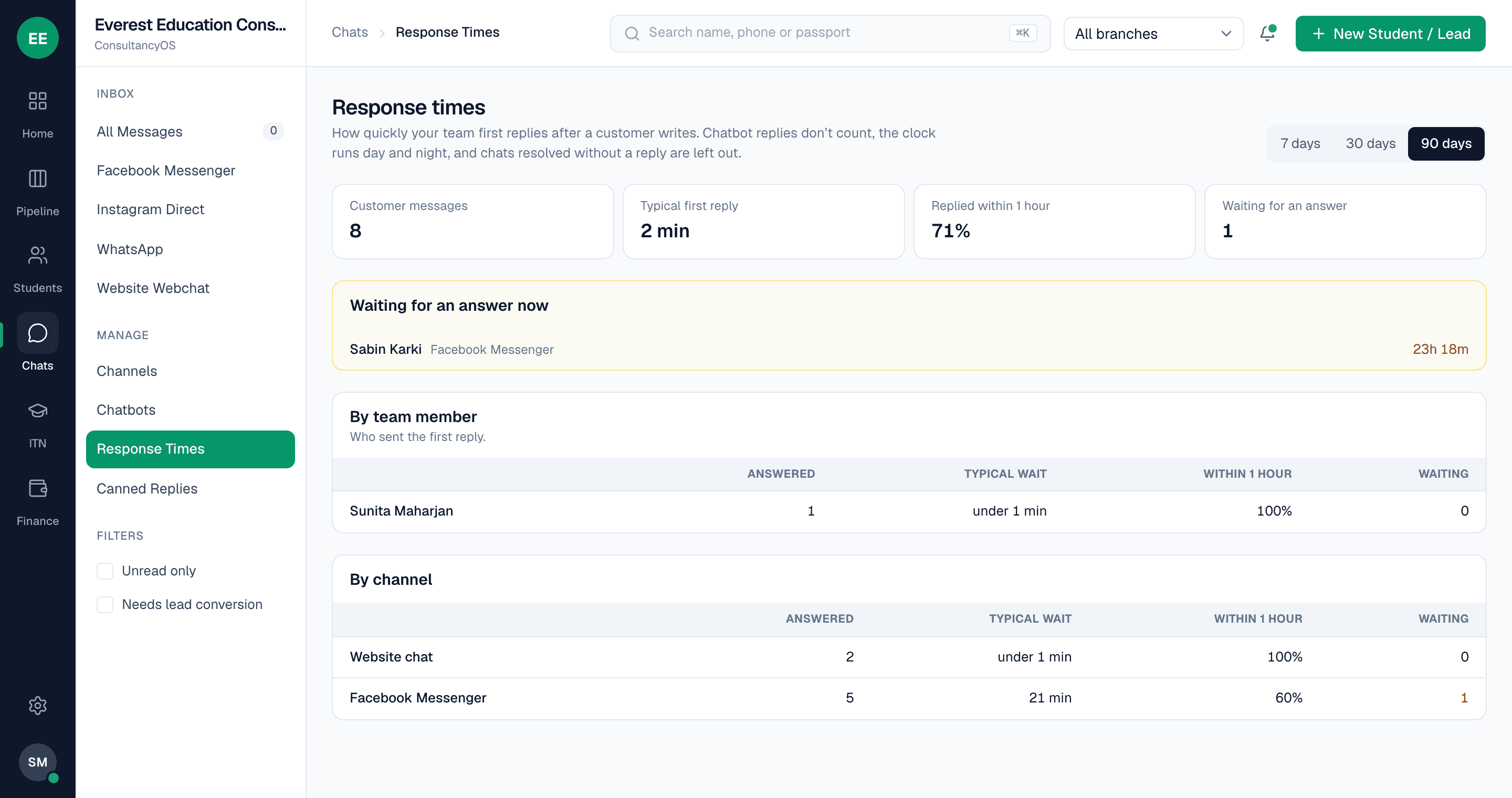
Response-time report
How long until a person first replies after someone writes, by team member and by channel, plus who is waiting for an answer now.
Counted honestly
Chatbot replies don't count, and the clock keeps running through the night.
For owners and branch managers
Only owners and branch managers see the response-time report.
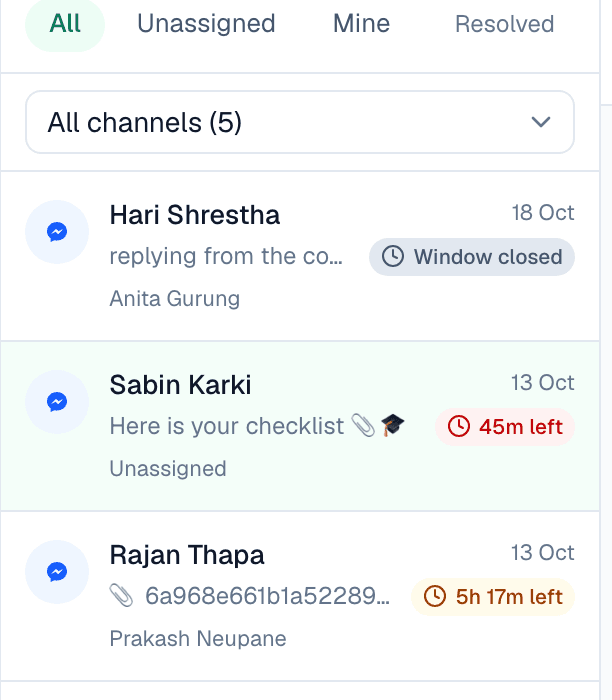
Reply countdown
A live timer for the 24-hour reply window on Messenger, Instagram and WhatsApp chats.
05 · Student files
A complete file for every student.
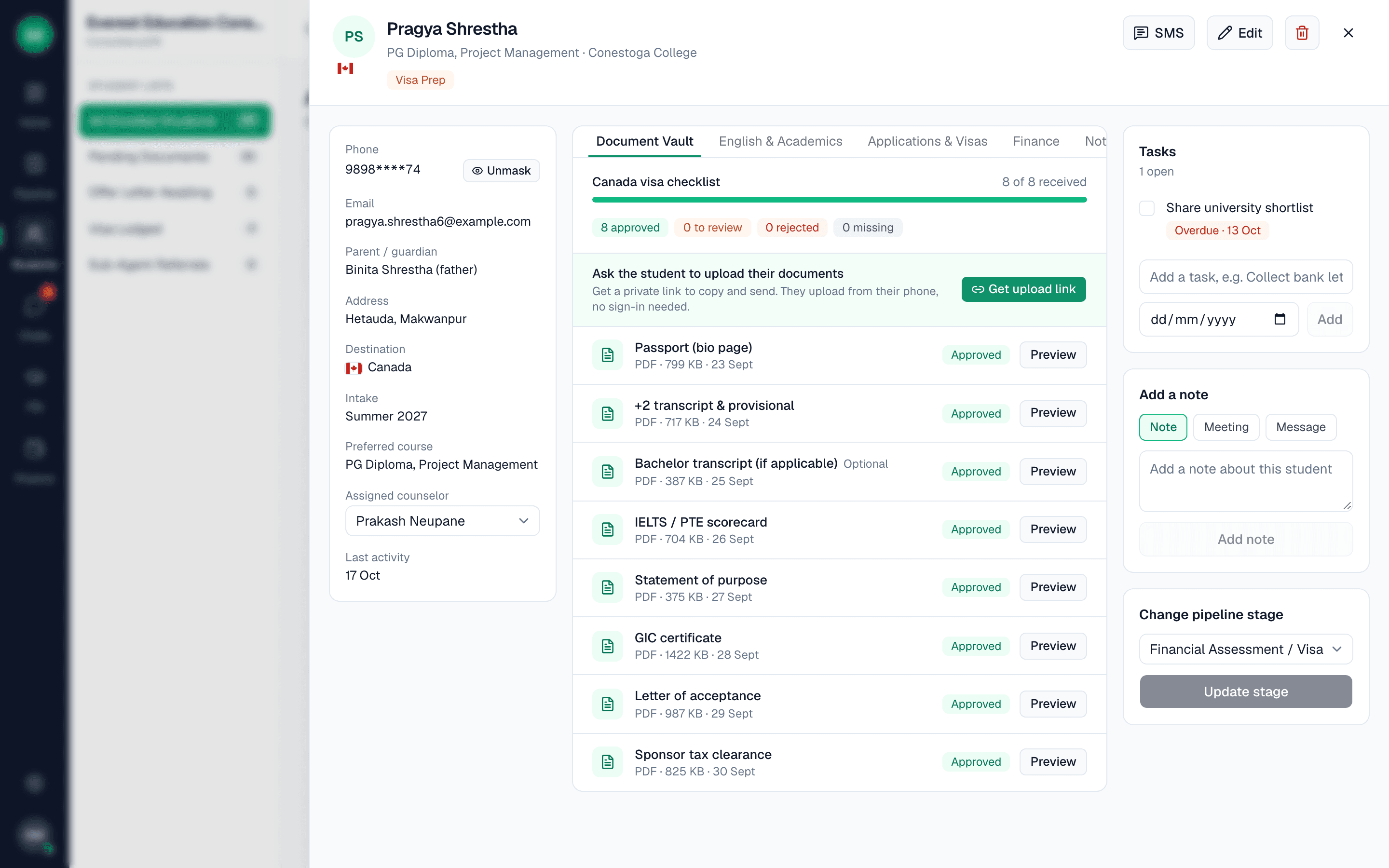
Anyone covering for a counselor sees the full picture at once: who the student is, where they stand, what is missing and what was said.
Student 360 profile
Contact and family details, passport, qualification and GPA, institution, destination, intake, preferred university and course, English test and scores, counselor and lead source, on one page.
Pipeline board by destination
A board with one column per stage, filtered by country. Rename, add and reorder stages, and mark which mean won (visa granted) and lost (refused).
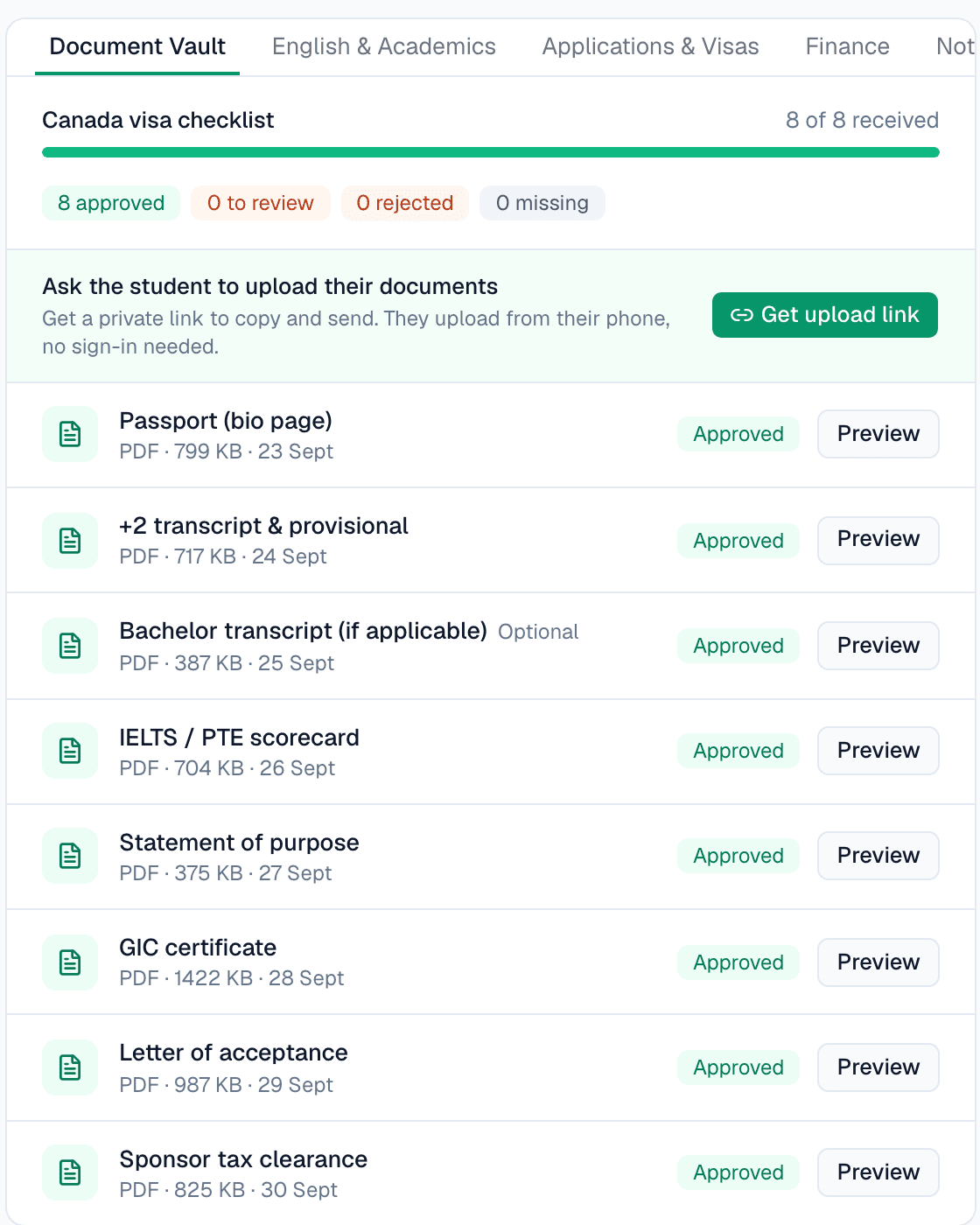
Document vault with checklists
Each destination has its own checklist, such as passport, transcripts, IELTS, bank statement, GIC or OSHC. Staff approve a document or reject it with a reason, and you edit every checklist.
Student upload link
A private link the student opens on their phone, with no login. They upload documents, see their stage, applications and payments, and send star-rated feedback. One link per student, expiring after 15 days.
Applications
Several universities and courses per student, each with an intake and a status from shortlisted to offer to accepted or rejected.
Notes, meetings and timeline
Every note, stage change, document review and message is logged with who did it and when, so history survives staff turnover.
Tasks and follow-ups
Tasks on a student with due dates, assigned to a counselor, with a company-wide view. There is no dialer or call tracking, by design.
Student feedback
Students rate and comment from their link. Counselors and the owner see it on the profile and in Telegram, and a low rating is flagged.
Find anyone fast
Search by name, phone or passport, or open the command menu with Cmd+K.
06 · Google review requests
Ask happy students for a Google review, after the good news.
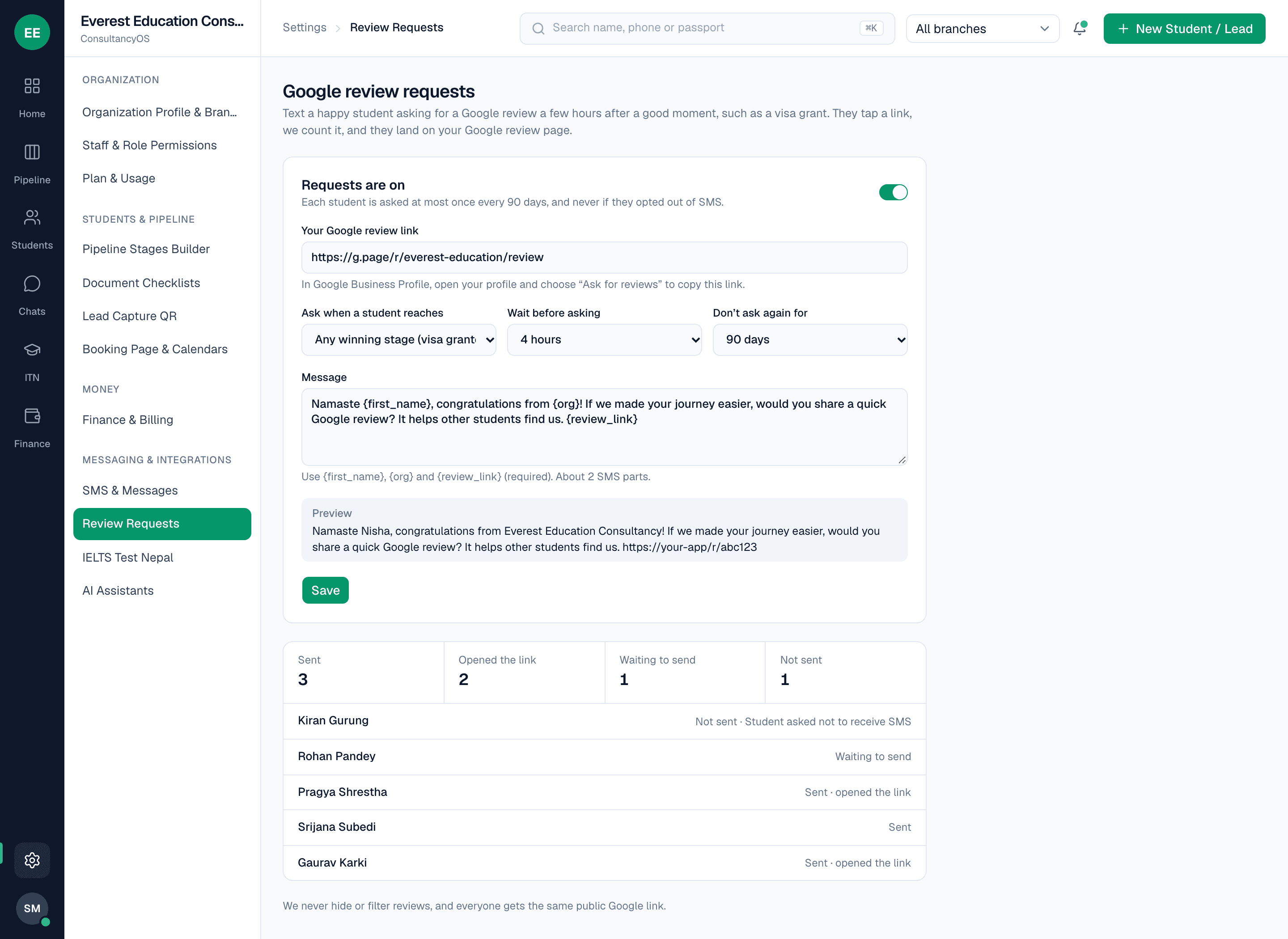
When a student reaches visa granted, ConsultMarg can text them a link to your Google review page.
Sent after a winning stage
By default the request goes when a student reaches visa granted. You can choose another stage in Settings, under Review Requests.
By SMS, a few hours later
Requests go by SMS only, 4 hours later by default. You can change the wait and the message.
See who opened it
The link passes through ConsultMarg first, so taps are counted, then lands on your Google review page. A log shows who was asked and who opened the link.
07 · Money
Money, the way Nepali consultancies handle it.
Invoices, receipts, expenses, university commissions, agent payouts and profit by branch, in one place.
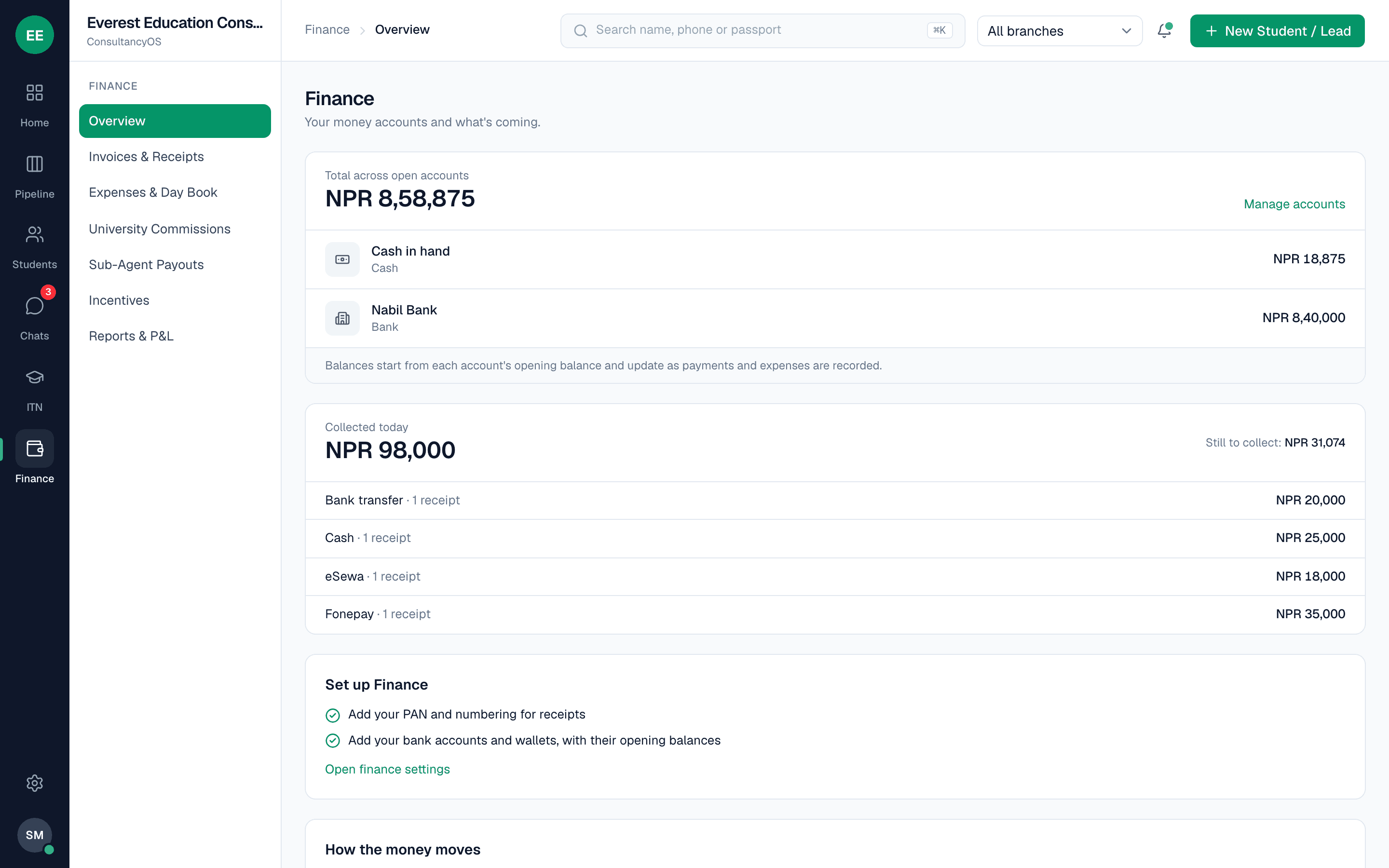
Invoices and receipts
Invoices with optional VAT, payments by cash, Fonepay, eSewa, Khalti, bank transfer or cheque, and printable A5 receipts. Numbers have no gaps. A mistake is voided with a reason, never deleted.
Expenses and day book
Log rent, ads and tea with a photo of the bill. Expenses above your limit wait for owner approval, and the cashier closes the day by counting the drawer against the system.
University commissions
When a student reaches visa granted, a commission claim is created. Track it from invoiced to received, with foreign currency, exchange rate, bank fee and tax withheld, and an ageing view that flags claims older than 60 days.
Sub-agent payouts
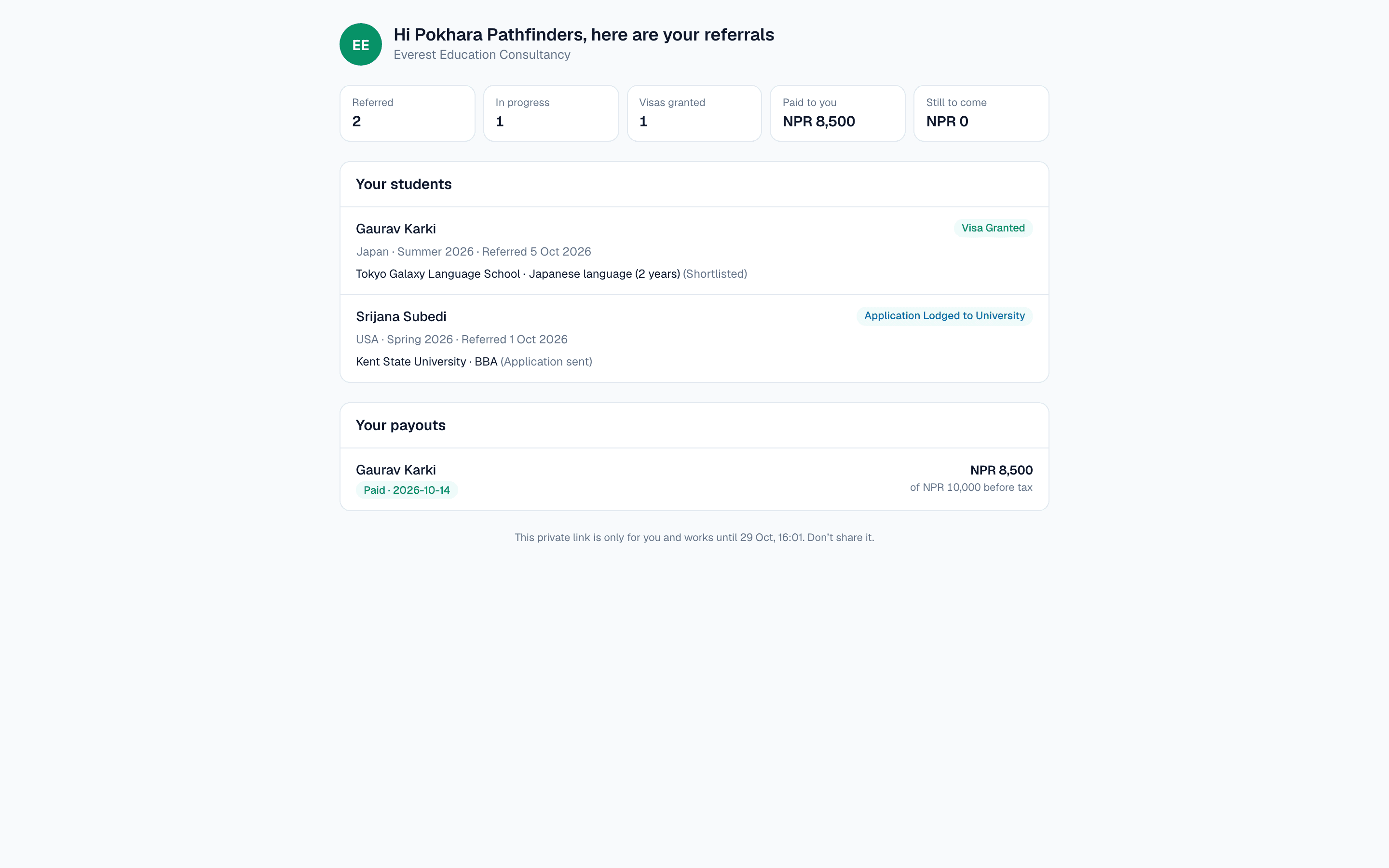
Agents are paid on fixed or percentage terms, and a payout stays locked until the university has actually paid. The owner approves, the accountant pays, and TDS goes into its own ledger.
Agent link, no login
Send a sub-agent a private, view-only link. They see only their own students, with stage, destination, intake and applications, plus their payouts, due and paid. They don't see documents, phone numbers, fees, notes or staff names. The link expires after 48 hours, a new link replaces the old one, and you can stop it early.
Counselor incentives
Bonus rules such as Rs 5,000 when a student reaches visa granted, optionally per country. They are counted automatically, approved by the owner and exported for payroll. Each counselor sees only their own.
Reports and profit and loss
Cash-basis income, costs and profit by month, by branch and by destination, a branch comparison, receivables and payables ageing, and CSV downloads.
Month close
Lock the books up to a date, so nothing from a closed period can be changed.
Bikram Sambat dates
Choose English dates, Bikram Sambat, or both. Receipts and finance screens use it, and the Nepali fiscal year is respected.
Finance per branch
Each branch keeps its own accounts and figures, and a branch accountant sees only their branch.
08 · Branches and roles
Several branches, several roles, one owner in control.
Your staff see only what their job needs, and you can see everything they did.
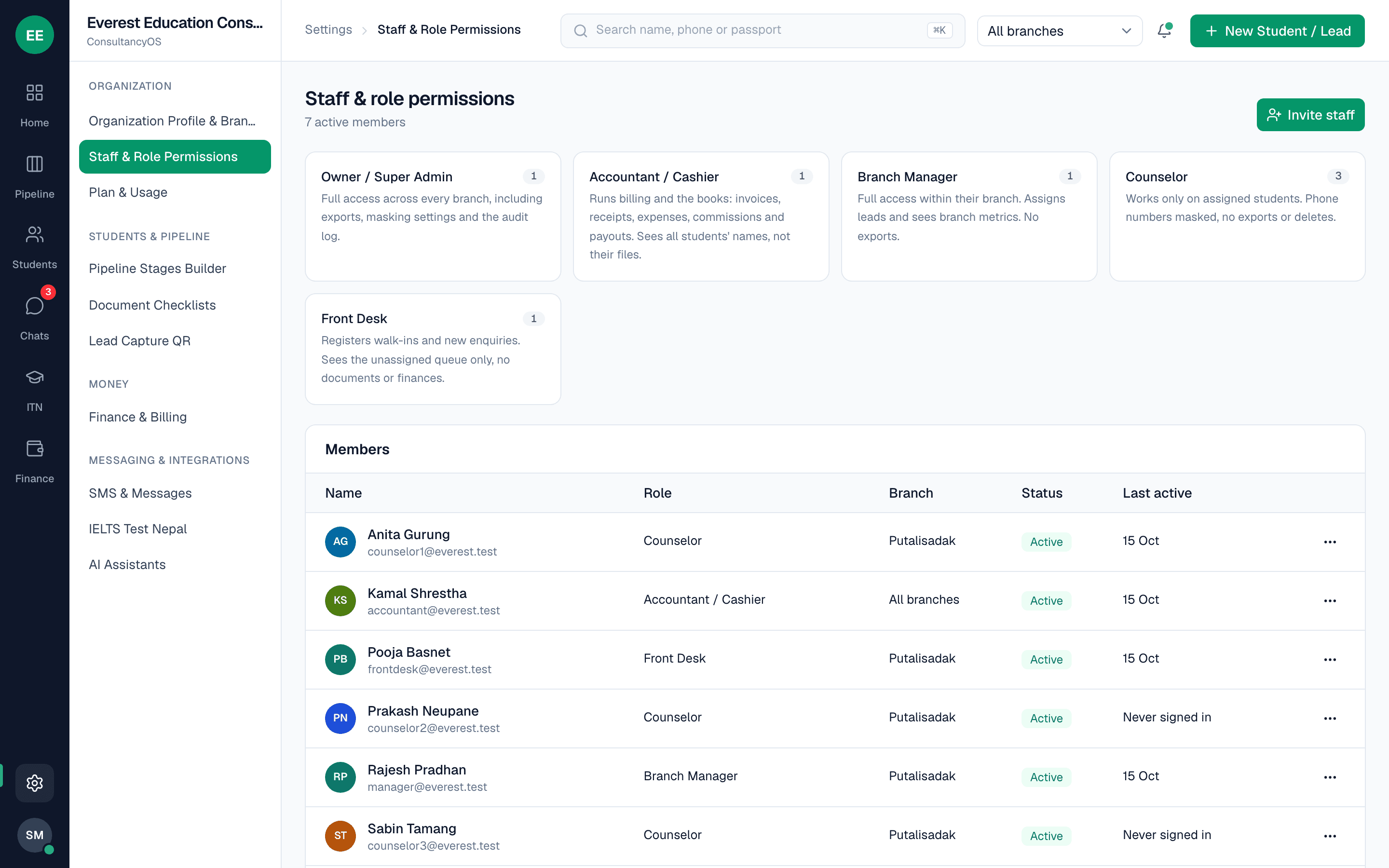
Five roles
Owner, branch manager, counselor, front desk and accountant. A counselor sees only their own students and never commissions or company profit. Front desk sees only the unassigned queue. The accountant sees finance but not student files.
Branch view
The owner and a company-wide accountant switch between branches with one picker. A branch manager sees only their branch.
Phone masking
Numbers show as 9841****23 everywhere. Revealing a full number is a deliberate click, and it is logged.
Audit log and exports
Who did what, and when, is recorded. Only the owner can export student lists.
Invitations only
Staff join by invitation. Public sign-up is off, so nobody can create an account on your workspace uninvited.
09 · Messages to students
Text your students without typing it 50 times.
SMS goes out through Sparrow SMS, with templates that fill in each student's details.
Templates
Messages with the student's name, counselor, destination, intake and stage filled in automatically.
One student or in bulk
Send to a single student, or to a group of up to 300 at once.
Automatic on a stage change
Send an SMS automatically when a student reaches a stage you choose.
Message log and allowance
A log shows what was sent and whether it succeeded. Each consultancy has a monthly SMS allowance, shown to the owner as x of y used.
10 · IELTS Test Nepal connection
Know a student's real level before the counseling call.
ConsultMarg connects to IELTS Test Nepal (ITN), the IELTS and PTE practice platform, with a single key. The two systems stay separate.
Connect and see your seats
Paste your ITN key and the app shows your consultancy's name and how many practice seats are left.
Assign a seat in one click
From a student's English tab, give them an IELTS Academic, IELTS General or PTE seat. A confirm box shows seats left, the request cannot charge twice if the network fails, and ITN emails the student their login.
Results come back by themselves
When a student finishes a test, their profile shows an ITN mock badge with the overall band and the four section bands. The timeline records it, the Telegram group is told, and the counselor sees the student is ready for university shortlisting.
An ITN overview
Seats, students with a seat, tests finished this month and the average band, plus students who plan a test but have no seat, seats ending soon and seats unused for a week.
These are mock-test results, not official IELTS or PTE scores. Classes and batches stay inside ITN.
11 · Works with your AI assistant
Ask your assistant to do the routine work.
For owners who like to experiment: connect an assistant such as Claude, and it works with your role and branch limits.
What it can do
Search students, read a student's file, add leads, move a student's stage, log a follow-up, and bring in an old spreadsheet in bulk with a 48-hour undo.
Kept on a short lead
The assistant acts as the person who created its key. Phone numbers stay masked, at most 25 students come back at a time, and every action is logged.
Revoke it instantly
You create the key, and you can switch it off at any moment.
12 · Make it your own
It follows how your consultancy works.
We set you up and support you. After that, most of what matters is yours to change.
Your branding
Your logo and browser-tab icon on the app, the reception form and the student link.
Your stages and checklists
Edit the pipeline stages, the countries and every document checklist.
Plan and usage
See your plan limits and how much storage you have used.
How it compares
Built for consultancies, priced for the whole team.
How ConsultMarg compares with a typical per-user CRM, and with running everything on Excel and WhatsApp.
How the price works
- ConsultMarg
- One price for the consultancy, from NPR 5,000 a month
- A typical per-user CRM
- Usually a fee for every staff login
- Excel and WhatsApp groups
- Free, but it costs your team hours
Hiring another counselor
- ConsultMarg
- Same bill, within your plan's staff limit
- A typical per-user CRM
- Usually adds to the monthly bill
- Excel and WhatsApp groups
- One more phone in the group
Built for study-abroad work
- ConsultMarg
- Pipelines by destination and document checklists by country
- A typical per-user CRM
- Usually set up by you, from a sales template
- Excel and WhatsApp groups
- A separate sheet for each country
Booking a counselling session
- ConsultMarg
- A booking widget on your website that assigns the counselor for you
- A typical per-user CRM
- Usually a separate scheduling tool
- Excel and WhatsApp groups
- Back-and-forth messages to find a time
When a new lead arrives
- ConsultMarg
- Telegram alert, and one counselor claims it with a tap
- A typical per-user CRM
- Usually an email or app notification
- Excel and WhatsApp groups
- A message in a group, and nobody sure who owns it
University commissions and sub-agent payouts
- ConsultMarg
- Tracked from claim to bank, with ageing and a TDS ledger
- A typical per-user CRM
- Usually custom fields or another tool
- Excel and WhatsApp groups
- Tracked by hand, if at all
Sub-agents checking what they're owed
- ConsultMarg
- A view-only link, valid for 48 hours: their students, each one's stage, what is due and paid
- A typical per-user CRM
- Usually a separate portal login, if offered
- Excel and WhatsApp groups
- Phone calls and WhatsApp messages
Nepal-specific money
- ConsultMarg
- Bikram Sambat dates, VAT, TDS, Fonepay, eSewa and Khalti
- A typical per-user CRM
- Usually not built in
- Excel and WhatsApp groups
- Typed by hand
Protecting your student list
- ConsultMarg
- Masked phone numbers, owner-only export and an audit log
- A typical per-user CRM
- Usually depends on the plan and setup
- Excel and WhatsApp groups
- Anyone with the file can copy it
What students use
- ConsultMarg
- A private link on their phone, no app and no login
- A typical per-user CRM
- Usually a portal login, where one exists
- Excel and WhatsApp groups
- Photos sent one at a time on WhatsApp
The per-user CRM column describes how such tools usually work. Individual products differ.
Book a demo
See your next lead claimed, live.
In 30 minutes we'll show you the inbox, Telegram, a student file and the money side, using a sample consultancy. Then you decide whether to start a 14-day pilot.
Tell us about your consultancy. It takes a minute.
We reply the same business day to find a time.
30-minute demo. Then you decide whether to start a 14-day pilot.